
AI models like Claude and GPT-4 are powerful — but they are stuck in a box. They cannot browse your files, query your database, or call your APIs without custom glue code. MCP changes that entirely.
Model Context Protocol (MCP) is an open standard created by Anthropic in late 2024. It defines a universal way for AI models to connect to external tools and data sources. Think of it as USB-C — one standard that works everywhere.
---
Why MCP Exists — The Problem It Solves
Before MCP, connecting an AI to a tool required custom integration for every single combination:
Claude + GitHub → custom code
ChatGPT + Notion → different custom code
Cursor + your database → yet more custom code
This was an N×M problem. Every AI times every tool needed its own connector. MCP collapses this to N+M — build one MCP server for your tool, and every MCP-compatible AI can use it instantly.
---
How MCP Works — The Architecture
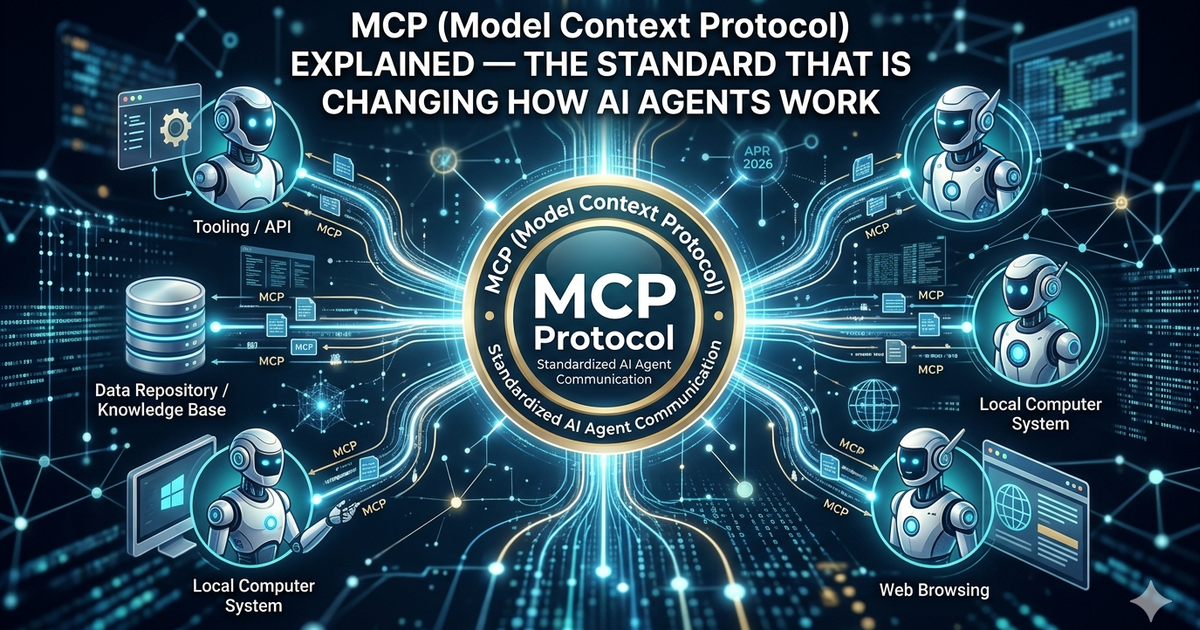
MCP has three core components:
MCP Host — the AI application (Claude Desktop, Cursor, your app)
MCP Client — lives inside the host, manages connections
MCP Server — lightweight process that exposes tools and data
The flow is simple: the AI host connects to one or more MCP servers. Each server exposes capabilities — tools to call, resources to read, prompts to use. The AI model decides which tools to invoke based on the user request.
---
What MCP Servers Can Expose
1. Tools (Actions)
Functions the AI can call — like running a query, creating a file, or sending a message:
// Example tool definition in an MCP server
{
  name: "create_github_issue",
  description: "Creates a new issue in a GitHub repository",
  inputSchema: {
    type: "object",
    properties: {
      repo: { type: "string", description: "owner/repo format" },
      title: { type: "string" },
      body: { type: "string" }
    },
    required: ["repo", "title"]
  }
}
2. Resources (Data)
Read-only data the AI can access — files, database records, API responses:
// Resource example — expose a database table
{
  uri: "postgres://mydb/users",
  name: "Users Table",
  description: "All registered users",
  mimeType: "application/json"
}
3. Prompts (Templates)
Pre-built prompt templates the host can surface to users — useful for consistent workflows.
---
Building Your First MCP Server
Here is a minimal MCP server in TypeScript using the official SDK:
import { McpServer } from "@modelcontextprotocol/sdk/server/mcp.js";
import { StdioServerTransport } from "@modelcontextprotocol/sdk/server/stdio.js";
import { z } from "zod";

const server = new McpServer({
  name: "my-first-mcp",
  version: "1.0.0",
});

// Register a tool
server.tool(
  "get_weather",
  "Get current weather for a city",
  { city: z.string().describe("City name") },
  async ({ city }) => {
    // Call your weather API here
    const data = await fetchWeather(city);
    return {
      content: [{ type: "text", text: `Weather in ${city}: ${data.temp}°C, ${data.condition}` }],
    };
  }
);

// Start the server
const transport = new StdioServerTransport();
await server.connect(transport);
console.log("MCP server running");---
Connecting to Claude Desktop
Once your server is built, add it to Claude Desktop config:
// ~/Library/Application Support/Claude/softwarethatbenefits_desktop_config.json
{
  "mcpServers": {
    "my-weather-server": {
      "command": "node",
      "args": ["/path/to/your/server/index.js"]
    }
  }
}
Restart Claude Desktop and your tools will appear automatically. Claude will use them when relevant to the conversation.
---
Who Has Adopted MCP?
MCP adoption exploded throughout 2025:
Anthropic Claude — built MCP, fully integrated
Cursor — MCP support shipped in early 2025
Windsurf — native MCP integration
OpenAI — announced MCP compatibility in 2025
Zed, Replit, Sourcegraph — all shipping MCP support
---
MCP vs Function Calling — What Is the Difference?
Function Calling — model-specific, defined per API call, not reusable
MCP — model-agnostic, server runs independently, reusable across any host
Function Calling — tools live in your app code
MCP — tools live in a separate process, discoverable at runtime
---
Real-World Use Cases
Dev tools — AI reads your repo, runs tests, creates PRs automatically
Data analysis — AI queries your database directly from chat
Customer support — AI looks up orders, issues refunds via your internal APIs
Documentation — AI searches your Notion/Confluence and gives accurate answers
DevOps — AI monitors logs, restarts services, creates incidents
---
Security Considerations
Only expose what is necessary — do not give AI write access if read is enough
Validate all inputs — treat MCP tool calls like any untrusted API input
Use OAuth for sensitive tools — MCP supports auth flows
Audit logs — log every tool call your MCP server receives
---
Getting Started Today
Install Claude Desktop — easiest way to test MCP locally
Try existing servers — github.com/modelcontextprotocol/servers has 20+ official ones
Read the spec — modelcontextprotocol.io has full documentation
Build your own — use the TypeScript or Python SDK
# Install the MCP TypeScript SDK
npm install @modelcontextprotocol/sdk

# Or Python SDK
pip install mcp
---
Final Thoughts
MCP is not hype — it is infrastructure. The same way REST APIs standardized how web services talk to each other, MCP is standardizing how AI agents talk to the world.
If you are building AI-powered tools in 2026, learning MCP is not optional. It is the foundation every serious AI integration will be built on.
---
Resources
Official Spec — modelcontextprotocol.io
TypeScript SDK — github.com/modelcontextprotocol/typescript-sdk
Python SDK — github.com/modelcontextprotocol/python-sdk
Community Servers — github.com/modelcontextprotocol/servers

Indie Product Engineer focused on toolcraft — building free tools that just work.